These pages document master, which is unreleased and in development. The Quick Start installs the latest stable release; anything newer than that tag is marked in the text.
Code Copilot Team
An enforceable harness for AI-assisted coding: your rules, your workflow and your safety rails, applied the same way by every coding agent you use.
Built for Claude Code as the reference implementation, with the provider-neutral Pi enforced harness and portable conventions for Cursor, GitHub Copilot, Windsurf, Aider, and local LLMs.



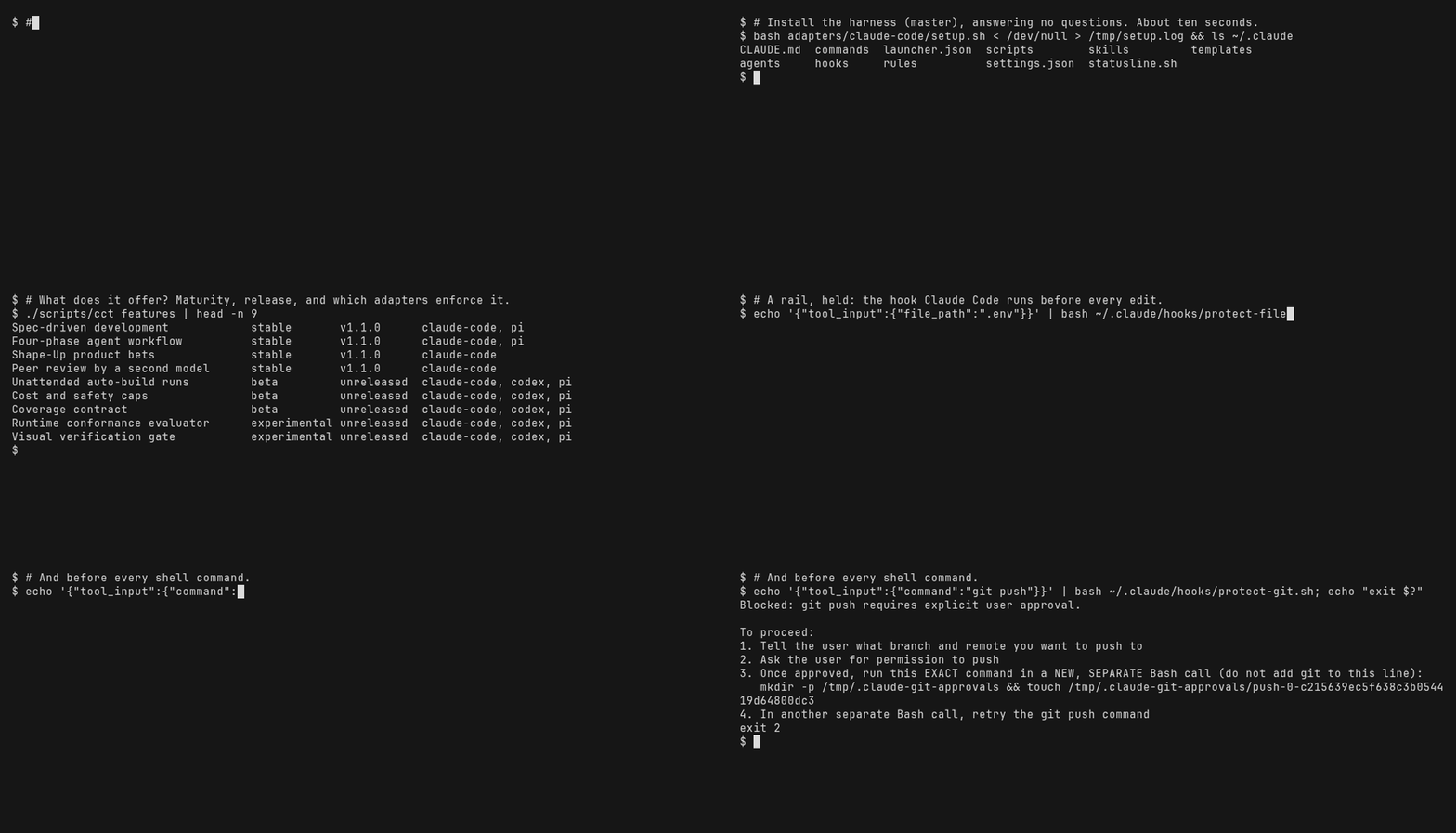
Recorded on master: the cct command is not in the latest release yet. Every command shown is run by CI before the GIF is rendered — docs/demo/.
📖 Deep dive: Stop Fighting AI Agents and Build a Reusable Multi-Agent Dev Environment — the full story behind this project, lessons learned from 13+ real build sessions, and why every rule exists.
What you get
Section titled “What you get”- Rules that hold. Coding standards, safety constraints and conventions install once and load in every session, on every tool — enforced by hooks on Claude Code and Pi, read as rules everywhere else.
- A workflow with gates. Research → Plan → Build → Review, where a phase cannot complete until its verification passes and, if you want one, a second model has reviewed the diff.
- A second opinion on demand. Point at any provider — a hosted API, a model on your own GPU, or another CLI — and it reviews your work against a fixed verdict contract.
- Unattended builds you can audit. A driver builds an approved feature phase by phase outside the session, under spend and time caps, and leaves a ledger of every decision.
- Evidence instead of impressions. Sessions, costs and benchmark runs land in a local store with a web UI, so a change to your setup is measured rather than felt.
Quick Start
Section titled “Quick Start”About five minutes from clone to a first session.
git clone --branch v1.1.0 https://github.com/gosha70/code-copilot-team.gitcd code-copilot-team
# 2. Install for your tool — see "Choose your tool" below./scripts/setup.sh --claude-code    # Claude Code → ~/.claude/
# 3. Open a project — global rules load automaticallyclaude-code ~/projects/my-app
Every other install path — Pi, Codex, Cursor, Copilot, Windsurf, Aider, the Claude Code plugin — is in Install options.
Stable versus unreleased.
v1.1.0is the latest release and what the Quick Start installs. Some of what this page describes landed after it: thecctcommand-line front door and the generated feature index, the reviewer readiness probe, and unattended auto-build runs. To use those, work frommasterinstead —git checkout master && ./scripts/setup.sh --sync --claude-code— and read it as in-development. Lines below marked (master) need it.
./scripts/cct list # (master) every feature, command, skill and capabilityChoose your tool
Section titled “Choose your tool”Two harnesses enforce the contract at runtime; the rest receive it as rules they read. The counts come from the feature catalog, so this table cannot drift from what the adapters actually deliver.
| Tool | What it gives you | Install |
|---|---|---|
claude-code |
15 features enforced — a gate that can block — and 0 more as rules it reads | ./scripts/setup.sh --claude-code |
pi |
8 features enforced — a gate that can block — and 6 more as rules it reads | ./scripts/setup.sh --pi |
codex |
6 features enforced — a gate that can block — and 9 more as rules it reads | ./scripts/setup.sh --codex |
aider |
9 features as rules the tool reads; no runtime gate | ./scripts/setup.sh --aider |
cursor |
9 features as rules the tool reads; no runtime gate | ./scripts/setup.sh --cursor |
github-copilot |
9 features as rules the tool reads; no runtime gate | ./scripts/setup.sh --github-copilot |
windsurf |
9 features as rules the tool reads; no runtime gate | ./scripts/setup.sh --windsurf |
What “enforced” and “advisory” mean, per feature and per capability, is in feature maturity and the generated compatibility matrix.
Five minutes each
Section titled “Five minutes each”Three paths that end in something you can check. Each says what to expect and what to do when it does not happen.
Your first session
Section titled “Your first session”claude-code ~/projects/my-appExpect: the launcher opens a session with your git branch in the status
line, and the global rules load without being asked for.
Verify: ask the agent “which rules are loaded?” — it should name the four
global rules.
If not: run ./scripts/cct doctor (master) — it checks the tools, the
provider profile and each installed adapter, and says which is missing. Then
./scripts/setup.sh --sync --claude-code. Full layout:
configuration layers.
Your first peer review
Section titled “Your first peer review”# Declare a reviewer in ~/.code-copilot-team/providers.toml, then prove it# answers — the probe is a (master) command:scripts/review-round-runner.sh . --probe --peer <name> --subject claude --out /tmp/probe.jsonjq '{provider, verdict, duration_sec, error}' /tmp/probe.jsonExpect: exit 0 and a verdict of PASS, FAIL or INCONCLUSIVE.
Verify: claude-code --peer-review <name> ~/projects/my-app then
/review-submit at the end of a phase.
If not: exit 2 means nothing in the chain passed its healthcheck; exit 3
means the provider ran and returned no parseable verdict — the answer’s tail is
in the file. On v1.1.0, which has no probe, check the provider with
scripts/providers-health.sh --provider <name> instead. The ordered setup is
the auto code review cookbook.
Your first unattended run
Section titled “Your first unattended run”(master), and it has prerequisites: an approved SDD bundle for the feature
(spec.md, plan.md, tasks.md and a finalized verification.yaml), a
reviewer that answers, and gh authenticated for the pull request.
/auto-build my-feature # in a session: scaffolds specs/my-feature/automation.json/auto-build writes "profile": "advisory", and advisory publishes
nothing — it builds and reports. Choose what the run is allowed to do:
pr pushes the branch and opens a PR, merge additionally arms gated
auto-merge, and unattended is the profile that runs without you, which must
be declared in automation.json and pass admission first:
scripts/validate-spec.sh --unattended --feature-id my-feature # the admission barCCT_REVIEW_DIFF_MAX_LINES=4000 scripts/auto-build-loop.sh my-feature --profile unattendedExpect: admission passes, the driver builds phase by phase under the caps
in automation.json, and — on pr, merge or unattended — opens a pull
request at the end.
Verify: session-analytics runs (or the Studio’s Runs tab) shows the run,
its cost against the cap, and each phase’s review verdict.
If not: admission prints every failure rather than stopping at the first.
Once a run has started, the ledger under .cct/auto-build/<feature>/ says why
it stopped — termination.json names the reason and triage-report.md says
whether it can be resumed. See unattended auto-build.
Four-Phase Workflow
Section titled “Four-Phase Workflow”| Phase | Model | Effort | Delegation | What Happens |
|---|---|---|---|---|
| Research | Opus (highest) | High | None | Explore codebase, summarize findings, identify constraints |
| Plan | Opus (highest) | High | None | Design approach, get user approval |
| Build | Sonnet (fast) | Medium | Yes | Team Lead delegates to specialist sub-agents |
| Build (loop) | Sonnet (fast) | Medium | None | Ralph Loop: single agent iterates through stories autonomously |
| Review | Opus (highest) | High | None | Holistic review, run tests, verify consistency |
Each phase has a dedicated agent (~/.claude/agents/) that loads the relevant rules from the rules library. Planning and research must stay in one mind — sub-agents only see fragments and can’t reason about the whole system. Delegation only happens during Build. For smaller features, Ralph Loop provides a single-agent alternative: read PRD → implement next failing story → test → commit → repeat.

Working in a project
Section titled “Working in a project”claude-code init ml-rag ~/projects/my-rag-app # start from a templateclaude-code ~/projects/existing-api # or just point at an existing project
git pull && ./scripts/setup.sh --sync --claude-code # after pulling repo updatesclaude-code sync ~/projects/my-rag-app --dry-run # preview what would changeclaude-code sync ~/projects/my-rag-app # applySync updates commands and .claude/ contents but never overwrites your
CLAUDE.md. The eleven templates and their agent teams are in
project templates.
Everything it does
Section titled “Everything it does”Maturity labels are defined in feature maturity; a feature
marked unreleased is on master only. The full index with adapter support
per feature is docs/features.md, or ask the CLI
(master):
./scripts/cct features # one line per feature./scripts/cct features --adapter pi # what your tool actually enforces./scripts/cct features --feature auto-build- Spec-driven development — A feature is specified, planned and task-listed in
specs/<feature-id>/before any code is written, with an origin-alignment gate that stops the build when the working spec drifts from what the user asked for. - Four-phase agent workflow — Work moves through Research, Plan, Build and Review with a single agent in every phase but Build, where a Team Lead delegates to sub-agents; phase transitions are gated on verification.
- Shape-Up product bets — Rough ideas become pitches with an appetite, scopes and a circuit breaker; bets run against a hill chart and end in a retrospective and a cooldown report.
- Peer review by a second model — A second provider reviews the diff in a read-only sandbox and returns a PASS, FAIL or INCONCLUSIVE verdict with findings; the phase cannot complete on a FAIL, and a failed reviewer falls back down a chain.
- Unattended auto-build runs (beta) — An approved feature is built phase by phase by a driver outside the session, with a gating reviewer per phase, bounded fix sessions, a cost and wall-clock cap, a ledger, and a PR at the end.
- Cost and safety caps (beta) — An unattended run stops on its own when spend, wall-clock, review rounds or session turns exceed the caps frozen at admission, and the Studio raises an alert at 80% and 100%.
- Coverage contract (beta) — A run’s verification.yaml binds each requirement to the test that proves it, and the driver refuses a phase whose coverage fell below the frozen contract.
- Runtime conformance evaluator (experimental) — The built application is started and probed against the contract’s runtime criteria before the phase can land, so a green unit suite cannot hide a service that does not come up.
- Visual verification gate (experimental) — A UI feature’s run captures screenshots against the contract’s visual criteria and parks rather than passes when the capture cannot be made.
- Ralph Loop single-agent iteration — One agent iterates on a task until the verification command passes or the iteration cap is reached, with no delegation.
- Project templates and sync — A new project starts from a stack-specific CLAUDE.md with an agent team, slash commands and CI workflows, and an existing project can be re-synced to the latest template.
- UI design harness — Generated UI is steered by a committed DESIGN.md and design tokens and gated by a visual-review loop with an accessibility check and an anti-slop rubric.
- LLM wiki maintainer — Lessons and decisions are promoted into a curated project wiki that agents consult before re-reading raw sources, with an ingest pipeline and a lint.
- Benchmark harness (beta) — Coding agents are run against a task set through pluggable backends and scored with a judge, so a configuration change is measured rather than felt.
- Session analytics — Claude Code, Pi and Aider sessions are ingested into a store and queried for cost, turns, tool use, phases, labels and struggle signals from a CLI or an MCP server.
- Studio web UI (beta) — The analytics, benchmarks, auto-build runs, team alerts and the project’s own documentation are browsed in one local web app with a settings page for the judge and embedding providers.
- LLM routing profiles (experimental) — Auto-build tasks are routed to a backend by route class and role under an execution profile, with validate, status and explain commands and a scheduled tick.
- MemKernel persistent memory (experimental) — Session context is recalled at start, checkpointed before compaction and recovered after it by hooks that activate only when MemKernel is installed.
- cct command-line front door (experimental) — One provider-neutral command lists every slash command, skill and capability, drives routing, reports environment health with doctor, and explains or validates configuration with config.
Why this exists
Section titled “Why this exists”Every rule here is failure-driven: it exists because we hit the failure it prevents, usually more than once. External reviews, scorecards and the sources that shaped the harness are in Evidence & Influences, and the comparison with other spec-driven tooling is in SDD vs Code Copilot Team.
📖 Stop Fighting AI Agents and Build a Reusable Multi-Agent Dev Environment — the story behind the project.
Documentation
Section titled “Documentation”Claude Code specific:
- Setup Cookbook — deep-dive into every configuration option
- Config Guide — templates, agent teams, output styles, and workflow reference
- Hooks Guide — hook installation, customization, and supported stacks
- Hooks — Manual Test Cases — the by-hand checks that prove each hook fires and blocks
- Sub-Agents Guide — sub-agent configuration and usage
- Agent Teams — Claude Code’s experimental multi-session teams, and how they differ from in-session delegation
- Agent Traces — locating, reading, and archiving agent transcripts
- Debugging Strategies — /doctor, background tasks, Playwright MCP, trace debugging
- Permissions Guide — per-stack Allow/Deny wildcard patterns for /permissions
- Recommended MCP Servers — Context7, PostgreSQL, Filesystem, and Playwright MCP setup
Shared (all tools):
- Documentation site — every guide, searchable, published from
master - All documentation — the same guides in the repository, grouped as the Studio groups them
- Install Options — every install path, per tool, and what each adapter writes
- Configuration Layers — where each rule, skill, agent and hook is installed, and which layer wins
- Configuration Reference — every setting the harness reads, by the file it lives in (generated)
- Spec-Driven Development — the spec, plan and task artifacts, and the gates that enforce them
- Peer Review — how a second model reviews your work: the round, the verdict contract, the fallback chain
- Unattended Auto-Build — the driver, its caps, the coverage contract, the conformance evaluator and the visual gate
- LLM Routing — routing a task to a backend by route class and role
- Project Templates — the eleven stack templates, their agent teams and CI workflows
- Repo Structure — where everything lives, for contributors
- Developer Cookbook — the project SDLC end to end, in self-development and AI-harness modes
- Session Analytics Cookbook — configure, start, load sessions, read a session, run and validate the judge, troubleshoot
- Alignment Maintenance Checklist — recurring governance checks to keep framework alignment healthy
- Common Pitfalls — cross-cutting issues and solutions
- Delegation Best Practices — when and how to delegate to agents
- Ralph Loop Guide — Ralph Loop usage and configuration
- Session Management — session commands cheat sheet
- Code Reviewer Assistant Guide — peer review setup, commands, and safety model
- Error Reporting Template — standardized format for bug reports
- Phase Recap Template — end-of-phase handoff checklist
Contributing
Section titled “Contributing”See CONTRIBUTING.md. PRs welcome for new templates, rule improvements, and ports to other tools.
Community Standards
Section titled “Community Standards”- Code of Conduct
- Code Owners
- Security Policy
- Issue Templates
- Pull Request Template
- GitHub Hardening Playbook
Alignment Maintenance
Section titled “Alignment Maintenance”Use the recurring checklist in shared/docs/alignment-maintenance.md to keep this repo aligned as rules, skills, and templates evolve.